
A digital marketing audit and a plan you can act on
Before spending more, find out where your budget leaks. We review your ads, tracking, landing pages and funnel, then give you a clear plan in order of impact.
What our Audit & strategy service covers
Ad account review
Google Ads and Meta ads structure, targeting, bidding, budgets and creative.
Tracking check
Whether leads and sales are counted correctly in GA4, Google Ads and Meta.
Funnel and landing pages
Where visitors drop off between click and conversion, and why.
Strategy and targets
Channel mix, budget split and the cost per lead or return on ad spend to aim for.
How we run Audit & strategy
A clear process, repeated every month.
Discover
We learn your margins, sales process and goals, and get read-only access to your accounts.
Review
We audit accounts, tracking, pages and competitors, and size each problem.
Plan
You get a prioritised plan and a walkthrough call. Implement it yourself or with us.
What is a digital marketing audit?
A digital marketing audit is a structured review of how your online marketing is set up and how well it performs. Ours focuses on paid media: your Google Ads and Meta ads accounts, the tracking that measures them, the landing pages they send traffic to, and the funnel from click to customer. The result is a prioritised list of problems, sized by how much they cost you, and a plan to fix them.
What our digital marketing audit services cover
| Area | What we check |
|---|---|
| Ad accounts | Structure, keywords and audiences, bidding, budgets, ads and wasted spend in Google Ads and Meta |
| Tracking | Whether leads, calls and sales are counted correctly in GA4, Google Ads and Meta, and whether values are passed |
| Landing pages | Message match with ads, speed on mobile, forms, proof and calls to action |
| Funnel and CRM | What happens after the lead: response time, follow-up and how many leads become customers |
| Competitors | Who else bids on your searches, their offers and their ads |
How to do a digital marketing audit
If you want to run a first check yourself, work through these steps in order. Most problems show up in the first three.
- Check tracking first. Submit a test lead or order and confirm it appears once, with the right value, in GA4 and each ad platform. If tracking is wrong, every other number is too.
- Compare spend with results by campaign. List what each campaign spent and what it brought back over the last 90 days. Look for campaigns with spend and no conversions.
- Read the search terms. In Google Ads, review the actual searches that triggered your ads and note irrelevant ones.
- Click your own ads. Does the landing page continue the ad's promise? Does it load quickly on a phone?
- Follow a lead through. How fast is it answered, and does your CRM record which campaign it came from?
- Set targets. Work out what a lead or sale can cost and still be profitable, and compare that with what you pay now.
Small business digital marketing audit
Smaller businesses usually have fewer accounts but tighter budgets, so wasted spend hurts more. For small businesses we focus the audit on the few changes that matter most: tracking, search terms, location and schedule settings, and the landing page. You get a short, clear list rather than a long report.
From audit to strategy
An audit on its own is a list of problems. The strategy turns it into decisions: the target numbers that make your ads profitable, the budget each channel gets, the tests to run first and the reports you will see. We base targets on your own numbers, such as average order value, margin and close rate, not industry averages.
Free audit or paid audit?
Our free audit covers the main issues in your ad accounts and tracking, and tells you what to fix first. A full strategy, with target numbers, a channel plan and budget split, is part of our paid work. For channel-specific reviews, see our Google Ads audit and Meta ads audit.
Who it is for
Businesses already spending on Google Ads or Meta ads who are not sure it is working, businesses about to start paid ads who want a plan first, and teams who changed agency and want an independent view.
Real accounts. Real numbers.
Results from client ad accounts we manage. Client names are kept private.
Anonymized client accounts. Figures rounded down and converted to USD at approximate rates.
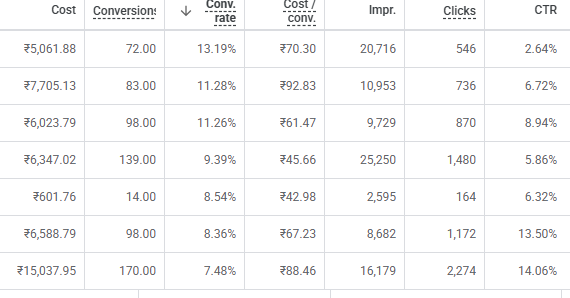
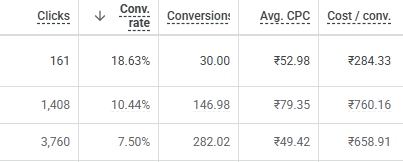
Screenshots from Google Ads accounts we managed. Client and campaign names are cropped out; numbers are unedited.
Frequently asked questions
What is a digital marketing audit?
A structured review of your marketing setup and results. Ours covers your Google Ads and Meta ads accounts, tracking, landing pages and funnel, and ends with a prioritised plan.
Is the audit free?
We offer a free audit covering the main issues in your accounts and tracking. A full strategy with targets and a channel plan is part of our paid work.
How do I do a digital marketing audit myself?
Start with tracking, then compare spend with results by campaign, read your search terms, click your own ads, follow a lead through your sales process, and set a target cost per lead or sale.
How long does an audit take?
Usually a few working days after we receive access, depending on how many accounts and channels are involved.
What access do you need?
Read-only access to Google Ads, Meta Ads Manager and GA4. You keep full control and can remove access at any time.
Do you audit small business accounts?
Yes. For small businesses we keep the audit short and focused on the few changes that will make the biggest difference to cost and leads.
Find out what your ad spend is really returning
A free review of your Google Ads, Meta ads and tracking. No obligation.
Get my free audit →