
A Google Ads and PPC audit that finds wasted spend and quick wins
We go through your Google Ads account line by line and show you where budget is wasted, what is holding performance back and what to fix first.
What our Google Ads audit service covers
Conversion tracking
Are conversions counted correctly, once, and with the right values?
Keywords and search terms
Irrelevant searches, missing negatives and match type problems.
Bidding and budgets
Bid strategies, targets and budget limits that restrict good campaigns.
Ads and landing pages
Ad relevance, assets, Quality Score and landing page experience.
How we run Google Ads audit
A clear process, repeated every month.
Access
You grant read-only access to Google Ads and GA4.
Review
We audit the account against our checklist and size each issue.
Walkthrough
You get a prioritised fix list and a call to go through it.
What is a PPC audit?
A PPC audit is a detailed review of a pay-per-click account, such as Google Ads, to find wasted spend, missed opportunities and setup problems. A Google Ads account audit checks tracking, structure, keywords, search terms, bidding, ads, landing pages and settings, and ends with a list of fixes ranked by impact.
What we check
| Area | Typical problems |
|---|---|
| Tracking | Double counting, page views counted as leads, missing call or form tracking |
| Search terms | Spend on irrelevant searches, no negative keyword lists |
| Structure | Too many or too few campaigns, mixed intents in one ad group |
| Bidding | Targets set too tight or too loose, budgets limiting the best campaigns |
| Ads | Few assets, weak headlines, ads that do not match the landing page |
| Settings | Wrong locations, unwanted networks, auto-applied recommendations |
Google Ads audit checklist
If you want to check your own account first, work through this list:
- Conversions: are primary conversions real business results, counted once, with values?
- Location settings: "presence" (people in your area) rather than "presence or interest"?
- Networks: are Search campaigns accidentally running on the Display Network?
- Search terms: what share of spend went to irrelevant searches in the last 30 days?
- Negative keywords: is there a shared list, and is it maintained?
- Budgets: are your best campaigns "limited by budget" while weaker ones spend freely?
- Bid strategy: do targets match what a lead or sale is worth to you?
- Ads and assets: does every ad group have strong responsive search ads, sitelinks, callouts and images?
- Auto-applied recommendations: are any switched on without your knowledge?
- Landing pages: do they match the ad, load fast on mobile and make the next step obvious?
How to audit a Google Ads account, in the right order
Start with tracking, because every other number depends on it. Then look at where the money goes: search terms and budgets. Then structure and bidding, and finally ads and pages. Fixing ad copy in an account that tracks the wrong conversions changes little.
What you receive
A clear list of issues ranked by impact and effort, with what we found, why it matters and how to fix it, plus a walkthrough call. You can fix them yourself or ask us to.
Free Google Ads audit
Our standard Google Ads audit is free and uses read-only access, so nothing in your account changes. Request your free audit. For a review that also covers Meta ads, landing pages and your funnel, see our digital marketing audit.
Real accounts. Real numbers.
Results from client ad accounts we manage. Client names are kept private.
Anonymized client accounts. Figures rounded down and converted to USD at approximate rates.
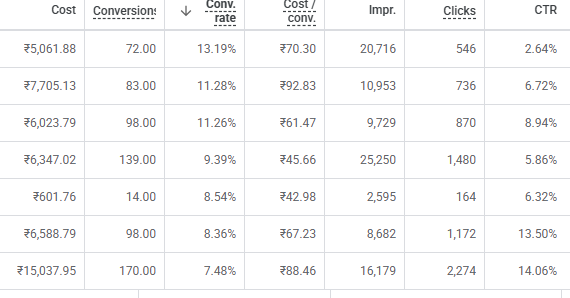
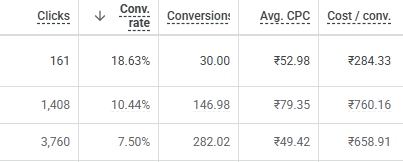
Screenshots from Google Ads accounts we managed. Client and campaign names are cropped out; numbers are unedited.
Frequently asked questions
What is a PPC audit?
A detailed review of a pay-per-click account to find wasted spend, missed opportunities and setup problems, ending with a prioritised list of fixes.
Is the Google Ads audit free?
Yes, our standard audit is free with no obligation.
How do I audit my own Google Ads account?
Start with conversion tracking, then search terms and budgets, then structure and bidding, then ads and landing pages. Our checklist on this page covers the main checks.
Will you change anything in my account?
No. The audit uses read-only access. Nothing changes unless you ask us to make the fixes.
How old should my account be?
Any age. Accounts with at least a few weeks of data give more detailed findings, but we can also review new accounts and setups.
How long does a Google Ads audit take?
Usually a few working days after we receive access, followed by a walkthrough call.
Find out what your ad spend is really returning
A free review of your Google Ads, Meta ads and tracking. No obligation.
Get my free audit →