
Performance Max campaigns that work for you, not just for Google
Performance Max reaches people across all of Google from one campaign. It only performs well with good inputs: accurate conversions, strong assets and clear signals. We set those up and keep them improving.
What our Performance Max service covers
Conversion goals
The right goals and values, so Google optimises for leads and sales that matter.
Asset groups
Headlines, images, videos and logos grouped by theme or product category.
Audience signals
Customer lists and interests that point Google to the right people.
Insights and controls
Search term insights, brand exclusions and negative keywords where available.
How we run Performance Max
A clear process, repeated every month.
Audit
We review what you run today, check tracking and agree the numbers that matter.
Build and test
We set up campaigns, creative and pages, then test versions against each other.
Scale and report
Budget moves to what works. You get a simple, jargon-free report every month.
What is Performance Max?
Performance Max (PMax) is a Google Ads campaign type that runs across all of Google's channels from one campaign: Search, Shopping, YouTube, Display, Discover, Gmail and Maps. Instead of choosing keywords and placements yourself, you give Google your goals, budget, creative assets and signals, and its AI decides where, when and to whom to show your ads.
How do Performance Max campaigns work?
You create asset groups: sets of headlines, descriptions, images, videos and logos, plus a product feed for ecommerce. Google mixes these into ads for each channel. Smart bidding then sets a bid for every auction to get the most conversions or conversion value within your budget and targets.
Google automatically optimises bids, placements, audiences and the combination of assets shown. What it cannot optimise for you is the quality of what you give it: the conversion data, the assets and the signals.
Does Performance Max use keywords?
Not in the usual way. Performance Max has no keyword lists. Instead you can add search themes to each asset group, which tell Google what your customers search for. Google treats them as guidance, alongside your landing pages, assets and feed. You can also apply negative keywords and brand exclusions to stop ads showing for searches you do not want.
How to add audience signals to Performance Max
Audience signals are suggestions that help Google find the right people faster. In each asset group, add:
- Your data: customer lists and website visitors. These are the strongest signals.
- Custom segments: people who searched for terms related to your business or visited similar websites.
- Interests and demographics: where they clearly match your customers.
Signals are not hard targeting. Google can show ads to people outside them if it predicts they will convert, which is why accurate conversion tracking matters so much.
How to optimize Performance Max campaigns
- Fix conversion goals first. Optimise for real leads or purchases with values, not page views.
- Structure asset groups by theme or product category, each with matching assets and landing pages.
- Provide every asset type, including your own video. Otherwise Google may create one automatically.
- Review insights: search term categories, asset performance, placements and channel reports.
- Exclude your brand where Search already covers it, so results reflect new demand.
- Give it time and budget. Frequent big changes reset learning.
When Performance Max works best
- Ecommerce stores with a healthy Merchant Center feed.
- Lead generation accounts with enough conversions and good lead quality tracking.
- Accounts where Search is already working and you want more reach.
It works less well with weak tracking, very small budgets or poor creative, because the automation has little to learn from.
Performance Max and Search together
Performance Max can show on searches your Search campaigns already cover. When a search exactly matches a keyword in a Search campaign, Search is preferred. We use Search for your most important keywords, where control matters, and Performance Max to find extra demand.
What we monitor
Conversions and value by asset group, search term categories, placement reports, asset performance and the share of results from new customers.
Real accounts. Real numbers.
Results from client ad accounts we manage. Client names are kept private.
Anonymized client accounts. Figures rounded down and converted to USD at approximate rates.
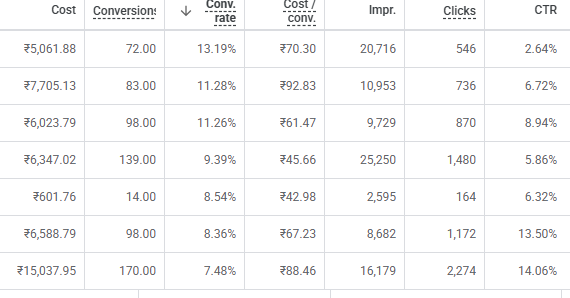
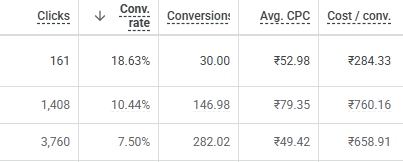
Screenshots from Google Ads accounts we managed. Client and campaign names are cropped out; numbers are unedited.
Frequently asked questions
What is a Performance Max campaign?
A Google Ads campaign that runs across Search, Shopping, YouTube, Display, Discover, Gmail and Maps from one campaign, using Google's AI to choose bids, placements and audiences based on your goals and assets.
Does Performance Max use keywords?
It has no keyword lists. You can add search themes as guidance, and apply negative keywords and brand exclusions to block searches you do not want.
Can you add negative keywords to Performance Max?
Yes. Negative keywords and brand exclusions can now be applied to Performance Max, which gives more control over which searches it covers.
Is Performance Max better than Search?
Neither is always better. Search gives control over keywords; Performance Max adds reach across Google's channels. Most accounts use both.
Do I need video for Performance Max?
It is strongly recommended. If you do not provide video, Google may create one automatically from your images, which is usually weaker.
Can I see where Performance Max ads show?
Partly. Google provides search term insights, placement reports and channel reporting, which we review regularly.
How long does Performance Max take to learn?
Usually a few weeks, depending on budget and conversion volume. We avoid frequent large changes during that time.
Find out what your ad spend is really returning
A free review of your Google Ads, Meta ads and tracking. No obligation.
Get my free audit →